
No products in the cart.

Take Control of Your Inbox & Boost Productivity
Unwanted emails can be a major distraction in the workplace, cluttering your inbox and making it harder to focus on important tasks. Whether it’s spam, promotional messages, or irrelevant newsletters, excessive emails can slow down productivity and waste valuable time.
If you’re working in Qatar and struggling with email overload, here’s a step-by-step guide to blocking unwanted emails and maintaining a distraction-free inbox.
Why You Should Block Unwanted Emails
- Saves Time – Reduces the need to sort through irrelevant messages.
- Boosts Focus – Eliminates distractions from non-work-related emails.
- Enhances Security – Prevents phishing and malicious email threats.
- Declutters Inbox – Keeps your inbox clean and organized.
How to Block Unwanted Emails in Gmail, Outlook & More
1. Unsubscribe from Unwanted Newsletters
Many promotional emails come with an unsubscribe link at the bottom. Click on it to stop receiving emails from that sender.
📌 Tip: If the email looks suspicious, don’t click any links—mark it as spam instead.
2. Use Built-In Email Filters
Most email services allow you to filter and block emails automatically.
In Gmail:
- Open the unwanted email.
- Click the three-dot menu (top-right corner).
- Select “Filter messages like this” and set up a rule to delete or archive similar emails.
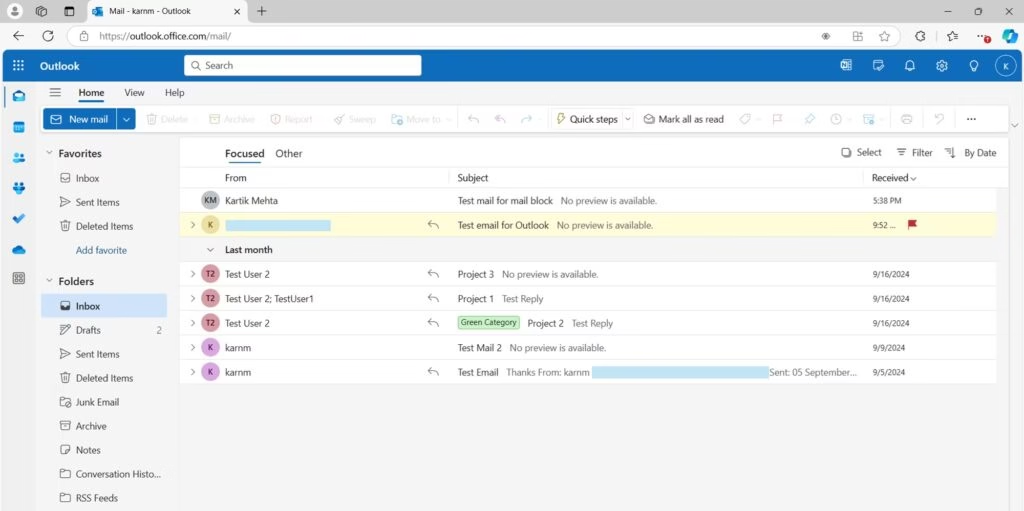
In Outlook:
- Right-click the email.
- Select “Junk” > “Block Sender” to prevent future emails from the sender.
For Other Email Services:
Look for settings related to spam filters, blocking, or filtering messages.
3. Mark Spam Emails to Train Your Inbox
Flagging spam emails helps your email provider recognize and block similar messages in the future.
- In Gmail & Outlook: Select the unwanted email and click “Report Spam” or “Junk”.
- In Yahoo Mail: Use the “Spam” button at the top of your inbox.
🔒 Tip: Be cautious of phishing emails that appear to be from banks, government offices, or tech companies. Always verify the sender before clicking links.
4. Use Third-Party Email Blockers
If spam and promotional emails persist, consider using tools like:
✅ Clean Email – Helps organize and filter emails automatically.
✅ Unroll.Me – Allows bulk unsubscribing from newsletters.
✅ MailWasher – Identifies and removes junk mail before it reaches your inbox.
Bonus: Tips to Stay Focused at Work
Even after blocking distractions, maintaining focus is essential. Here’s how:
✔ Use “Do Not Disturb” Mode – Silence notifications during work hours.
✔ Set Specific Email Checking Times – Avoid checking emails constantly; schedule it instead.
✔ Use Productivity Apps – Tools like Trello, Notion, and Asana help keep you organized.
Contact Us
Need expert IT solutions or help setting up email security for your business in Qatar? Contact Clever Computer Qatar today!
📍 Address: Shop No. 511, Bld 142, Zone 56, Street 1115, Dawodia City – Mesaimeer, Qatar
📞 Phone: +974 30039394
🌐 Website: www.clevercomputer.qa
📩 Email: info@clevercomputer.qa
💬 WhatsApp: +974 30039394
🕒 Shop Timings: Saturday–Thursday: 10 AM – 10 PM | Friday: Closed